Skip to content
View in the app

A better way to browse. Learn more.

Planet Hanyu

A full-screen app on your home screen with push notifications, badges and more.

To install this app on iOS and iPadOS
  1. Tap the Share icon in Safari
  2. Scroll the menu and tap Add to Home Screen.
  3. Tap Add in the top-right corner.
To install this app on Android
  1. Tap the 3-dot menu (⋮) in the top-right corner of the browser.
  2. Tap Add to Home screen or Install app.
  3. Confirm by tapping Install.

[2017] Fantasy on Ice (FaOI) in NIIGATA 2017
Featured Replies

9 minutes ago, katonice said:

More hand-drawn updates... anyone can translate?


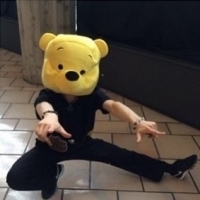
Yuzu came from the north side today instead of south (yesterday), he is in the front and center (well of course :laughing:) He act like a cat in high speed and then stroke his body and quickly lift his shirt :8788161: He skates through almost the whole rink and did 3T, after the 3T he did the cat pose again :10742290:

2 minutes ago, katonice said:

What's happening with Nobu? :laughing:


That is an entirely too long death scene lol (and annoying instagram won't give me  notifications quickly enough >.<)

4 minutes ago, katonice said:

What's happening with Nobu? :laughing:


King of interpretation and expression :goe:

Guest
This topic is now closed to further replies.

Account

Navigation

Search

Search

Configure browser push notifications

Chrome (Android)
  1. Tap the lock icon next to the address bar.
  2. Tap Permissions → Notifications.
  3. Adjust your preference.
Chrome (Desktop)
  1. Click the padlock icon in the address bar.
  2. Select Site settings.
  3. Find Notifications and adjust your preference.